đź“… Tuesday, February 24 @ 7:00pm – 9:00pm
📍Tea Leaf Cafe – 4224 Maple Rd. Suite 124 Amherst, NY 14226
✉️ RSVP to hello@buffalora.org
In the mean time connect with us on LongFast or at:
Keeping WNY Connected, One Message at a Time
đź“… Tuesday, February 24 @ 7:00pm – 9:00pm
📍Tea Leaf Cafe – 4224 Maple Rd. Suite 124 Amherst, NY 14226
✉️ RSVP to hello@buffalora.org
In the mean time connect with us on LongFast or at:
For InfoSec 716’s first meetup of the new year, they are thrilled to announce featured speaker SnyderMesh, presenting “Meshtastic – Decentralized Community-Wide Off-Grid Messaging”. Come learn about some cool mesh radio stuff, along with security news, the Dumpster Fire Of The Month, and all the other usual shenanigans!
PLEASE NOTE: This will be a HYBRID EVENT. If InfoSec 716 members would like to join us in person, we’ll be meeting at the Bit Haven hacker space, suite 351 in the Tri Main Building. We will also be streaming the meetup via Discord and Twitch. Whatever works for you, I hope you can join us!
đź“… Wednesday, Jan 21 from 6:00pm to 8:00pm
📍 Online registration: https://www.meetup.com/infosec-716/events/312130046/
📼 Recording: https://youtu.be/_DsATlXy814?si=xp2z07R0YDAao90v
📉 Materials: https://docs.google.com/presentation/d/1VVVoQMXMgPYCw-R4lRBwmBVR-49oiXRfKXbuCuBd8Vw/edit?usp=drivesdk
We look forward to the opportunity to make further partnerships in the Western New York region, connecting new nodes but most importantly connecting people.
đź“… Sunday, January 11th @ 1:00pm – 3:00pm
📍Panera Bread – 1747 Sheridan Dr, Tonawanda, NY 14223
✉️ RSVP to hello@buffalora.org
Hope to see you there!
In the meantime connect with the community on LongFast or on Discord:
How BuffaLoRa nodes connect to the wider mesh
One of the most powerful features of Meshtastic is its ability to bridge local LoRa meshes to the Internet using MQTT (Message Queuing Telemetry Transport). This allows geographically separated meshes to interoperate and enables global visualization tools like MeshMap.net.
This guide walks through configuring a Meshtastic node to:
The examples shown are from the Meshtastic mobile app, but the same concepts apply across platforms. For authoritative reference, see the official Meshtastic documentation:
https://meshtastic.org/docs/software/mqtt/
MQTT is a lightweight publish/subscribe protocol commonly used in IoT systems. In Meshtastic, MQTT allows:
MQTT is completely optional. BuffaLoRa supports both RF-only operation and hybrid RF + Internet bridging. Each node operator controls how their node participates.
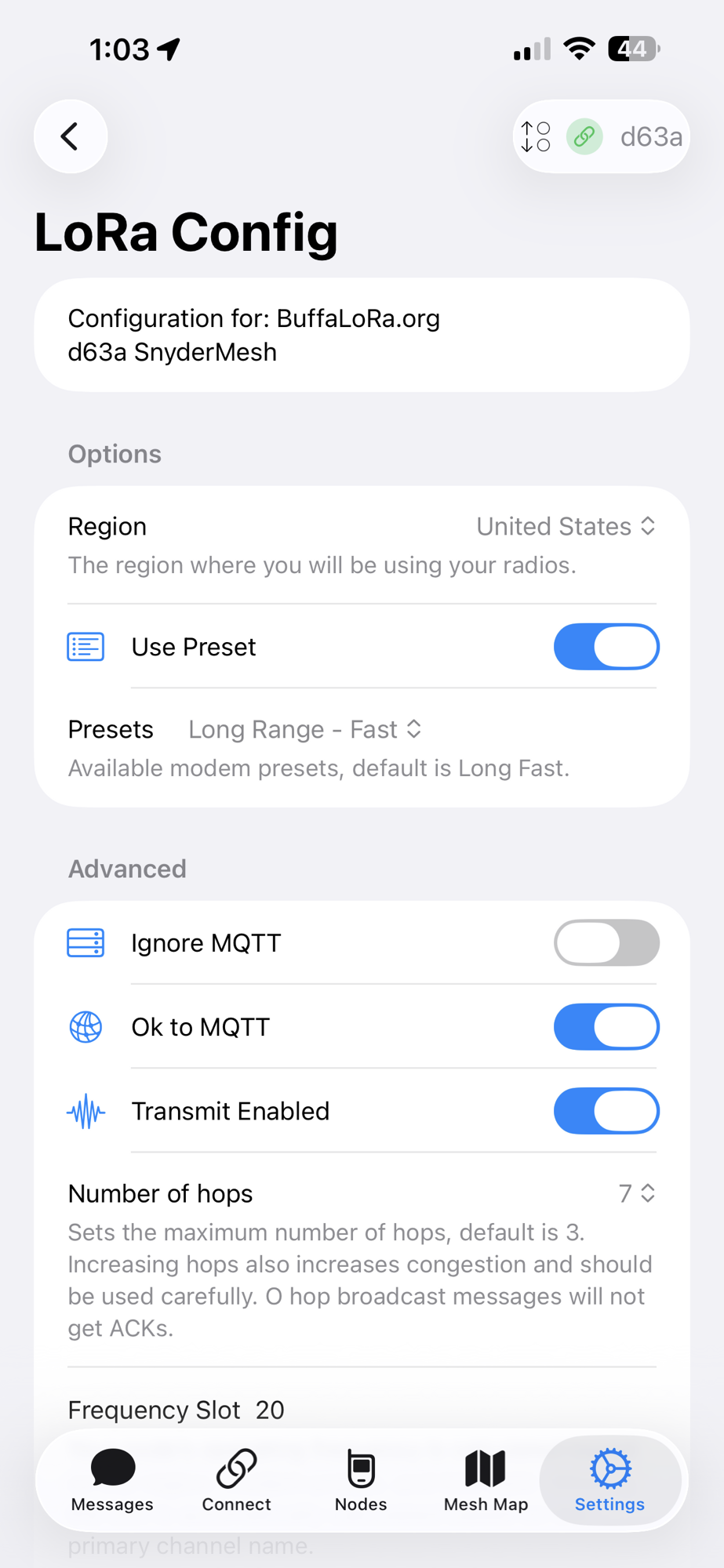
Before enabling MQTT, confirm your LoRa settings are correct under Settings → LoRa Config.
These settings explicitly allow your node’s traffic and metadata to be forwarded over MQTT when applicable.

Navigate to Settings → MQTT Config and enable the following:
Using the MQTT Client Proxy allows your phone’s Internet connection to act as the gateway, which is ideal for mobile and testing scenarios.

MeshMap.net relies on periodic MQTT map reports sent by participating nodes. To enable this:
Map reports include node ID, name, hardware model, firmware version, LoRa region, modem preset, and approximate location. This data is one-way and does not allow remote control of your node.
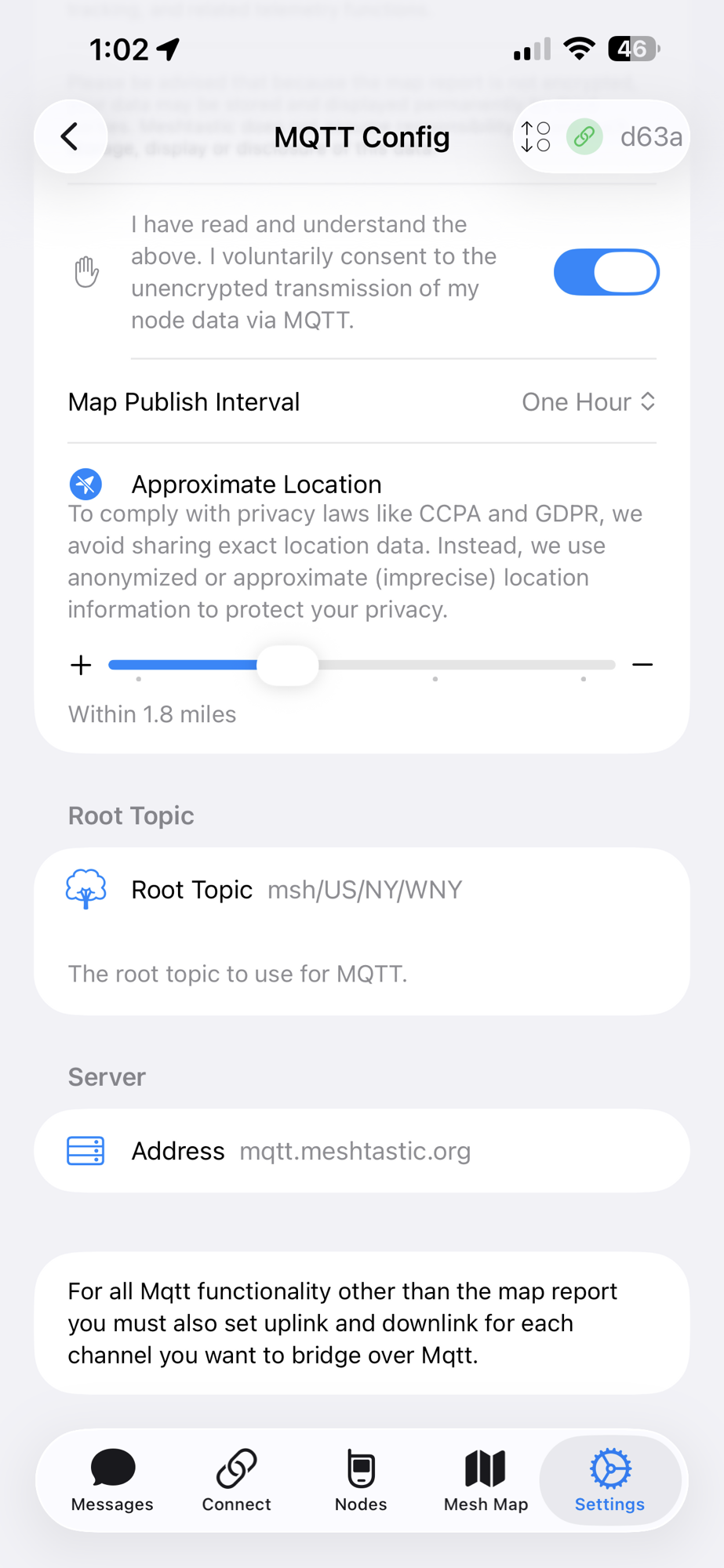
To balance visibility and privacy, Meshtastic allows you to share an approximate location instead of an exact GPS fix.
Your node will appear on MeshMap near its actual position without revealing an exact address. BuffaLoRa strongly recommends this setting for personal or residential nodes.
Verify the MQTT connection details:
mqtt.meshtastic.orgmsh/US/NY/WNYThis topic structure places your node in the Western New York namespace, allowing regional grouping on MeshMap and other MQTT-based tools.
📌 Note: For MQTT message bridging (beyond map reporting), uplink and downlink must also be enabled on the desired channels.
Map reporting works independently.

Enabling MQTT globally allows your node to connect to the broker, but
message bridging requires per-channel configuration.
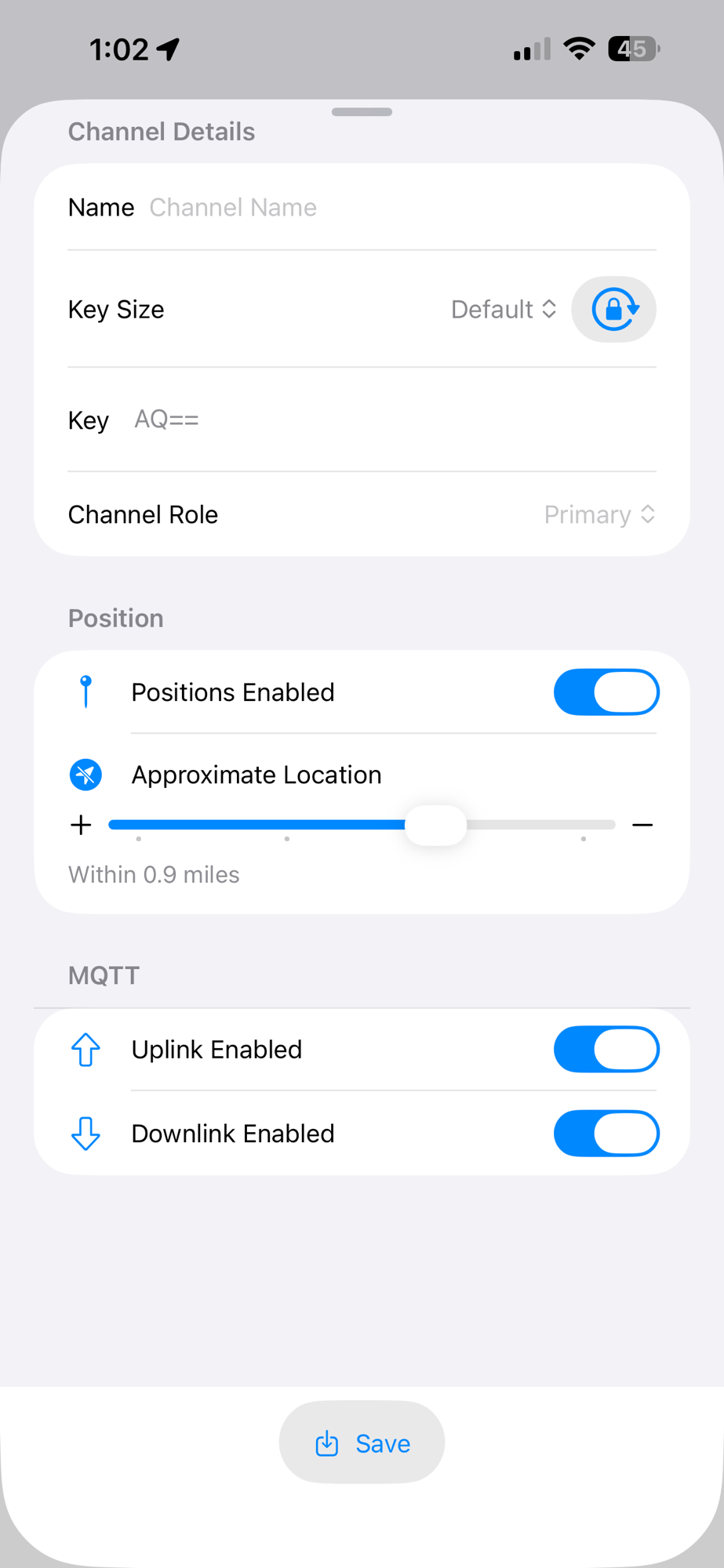
Each channel you want to bridge must explicitly allow MQTT uplink and/or downlink.
Navigate to Settings → Channels → (Select Channel).
With both enabled, messages can flow from local LoRa meshes to remote mesh users over the Internet.

By design, the default MQTT channel uses a zero-hop policy.
This behavior prevents routing loops, limits congestion, and keeps MQTT bridging predictable. Multi-hop propagation of MQTT-originated traffic should only be enabled intentionally and with care.
Note: MQTT uplink and downlink are not required for MeshMap position reporting. Map reports are configured separately under MQTT settings.
MQTT is especially useful for:
For grid-down or RF-only operation, MQTT can be disabled at any time without affecting local LoRa functionality.
MQTT extends Meshtastic from a local LoRa chat network into a globally aware, loosely federated mesh while preserving user choice and privacy.
By following the configuration outlined above, your node will:
🦬 📡 BuffaLoRa — Building resilient mesh communications for Western New York
Stretch your mesh by stretching each hop by using zero-cost hops
— Read on meshtastic.org/blog/zero-cost-hops-favorite-routers/
When the power goes out, cell towers fail, or connectivity simply doesn’t exist, communication quickly becomes the most critical resource. Whether you’re preparing for severe weather, extended grid outages, or heading deep into the backcountry, Meshtastic offers a proven, low-power, community-driven solution for staying connected when traditional networks aren’t available.
Originally developed with backcountry hiking and adventure travel in mind, Meshtastic has evolved into a powerful tool for emergency preparedness, disaster response, and community resilience.
Meshtastic uses LoRa (Long Range) radio to create a self-healing mesh network. Each node acts as both a user device and a relay, passing messages onward to extend coverage well beyond what a single radio could reach.
As more nodes join the network, the mesh becomes
stronger, more redundant, and more reliable. This decentralized design is exactly what makes Meshtastic so effective during grid failures and in remote environments.
Meshtastic is not theoretical — it has already been used in real emergencies:
In each case, Meshtastic helped fill the gap left by centralized systems, allowing communities to coordinate, share status updates, and maintain
situational awareness.
One of Meshtastic’s most powerful features is GPS position beaconing. Many devices include built-in GPS and periodically transmit their location
across the mesh.
For advanced use cases, Meshtastic integrates with
ATAK (Android Tactical Assault Kit), allowing mesh-based chat and GPS data to appear directly on shared maps. This dramatically improves situational awareness for coordinated teams.
When Meshtastic is paired with a low-power computer such as a Raspberry Pi, small x86 system, or Docker container, the mesh becomes far more than just a messaging platform.
When internet access is intermittently available, a mesh-connected BBS node can pull in weather alerts and forecasts and redistribute them locally across the mesh.
When completely offline, store-and-forward messaging continues to function, ensuring critical information is never lost.
With sufficient storage, mesh-connected systems can also provide:
Meshtastic devices are designed for ultra-low power consumption, making daily carry and regular use practical.
Some devices also offer everyday utility features such as e-ink status displays and MagSafe / Qi phone charging, making them useful even outside of emergencies.
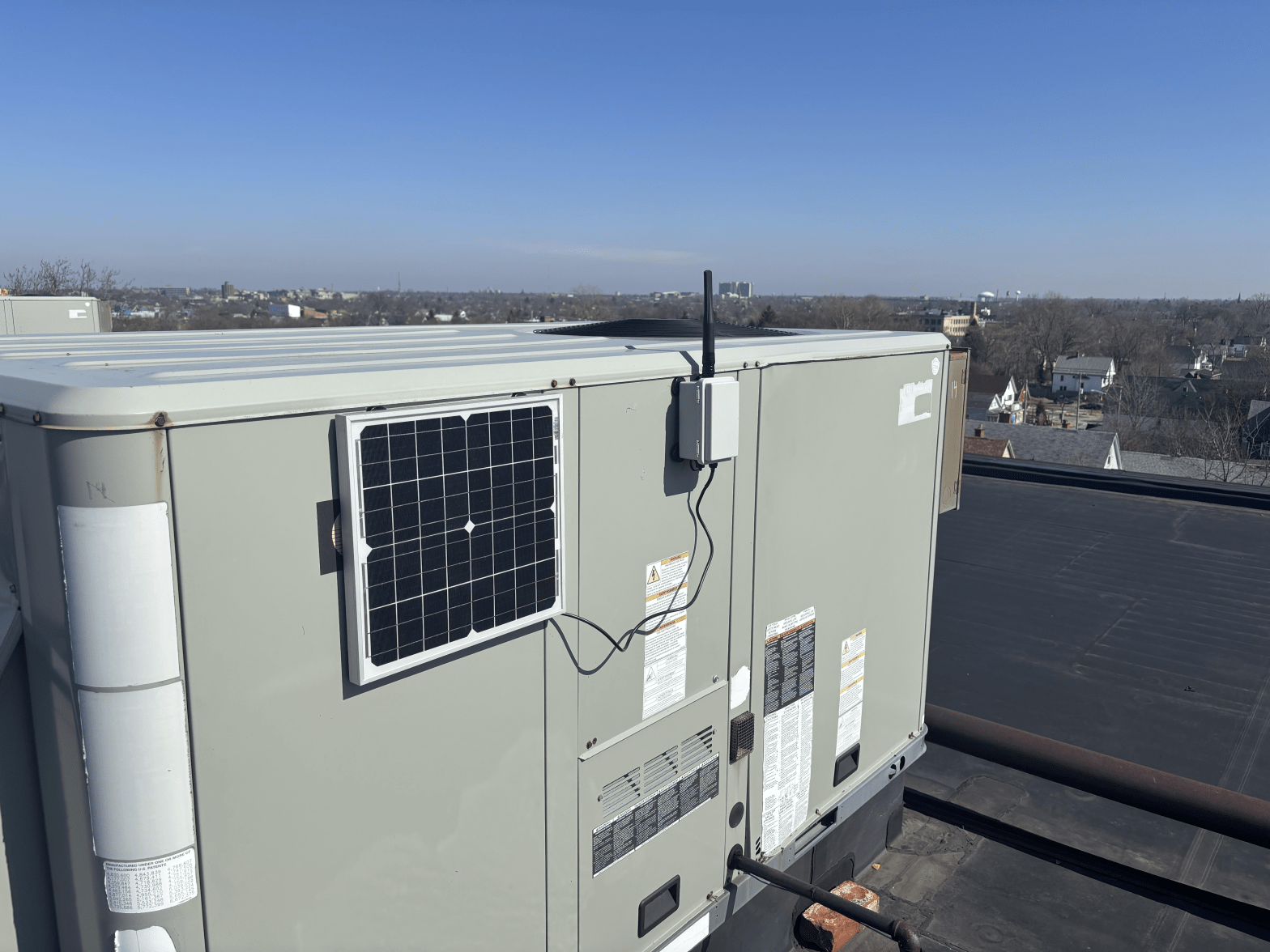
Permanent mesh infrastructure does not have to be expensive. DIY solar nodes can be built using hardware-store outdoor solar lights as enclosures,
18650 lithium batteries, and low-power LoRa radios.
These nodes can run for a week or more without sun and recharge fully in about one day of good sunlight.
For turnkey solutions, prebuilt solar nodes from vendors such as Seeed and PeakMesh are available starting around $100 and up.
Technology alone does not create resilience – people do. The BuffaLoRa mesh has already grown substantially, expanding coverage and strengthening regional preparedness.
We are deeply grateful for partnerships with BARRA and the opportunity to interconnect key sites such as
Cole Road and Kimball Hall repeater locations.
These collaborations are critical to building a resilient communications network.
Meshtastic empowers individuals, but it thrives through collective effort. Whether you are preparing for emergencies, exploring the backcountry, or experimenting with decentralized communications,
joining and using the mesh makes everyone stronger.
Preparedness isn’t just gear — it’s community.
And community is what makes the mesh strong.
One of the questions that comes up frequently in the BuffaLoRa community is: “How hard is it to update Meshtastic firmware over Bluetooth?” This week, I finally took the plunge and successfully performed an OTA (Over-The-Air) Bluetooth firmware update on one of my nRF52 based Meshtastic nodes (RAK WisMesh Tag) from iOS—and I’m happy to report that it worked exactly as advertised.
This post walks through the experience, highlights a few practical tips, and shows what the process looks like in the real world.
OTA firmware updates are a big deal for Meshtastic deployments, especially for:
Being able to update firmware wirelessly over Bluetooth saves time, reduces risk, and lowers the barrier to keeping nodes secure and up to date.
I followed the official Meshtastic documentation for nRF52 OTA updates, which you can find here:
👉 https://meshtastic.org/docs/getting-started/flashing-firmware/nrf52/ota/
The guide is clear and well-structured, and it closely matches what you’ll see in the Meshtastic tooling.
Before opening any mobile apps, I first downloaded the latest stable Meshtastic firmware for my hardware.
I navigated to the official Meshtastic downloads page:
👉 https://meshtastic.org/downloads/
From there, I followed the link to the Official Meshtastic GitHub releases and downloaded the appropriate firmware ZIP file for my node.
For my device (an nRF52840-based node), the correct file was:
firmware-nrf52840-2.7.15.567b8ea.zip
I downloaded the ZIP file locally on my phone so it would be available to select during the OTA update process.
I then used the Files app to open and “unzip” this file, allowing access to the device specific ZIP files within.

All subsequent steps were performed using Nordic Semiconductor’s nRF Device Firmware Update app, which is required for Bluetooth DFU.
The app is available on the Apple App Store:
nRF Device Firmware Update (iOS)
Once installed, I opened the app and saw that I landed on the Firmware Upgrade screen.
Before starting the update, I clicked on Settings to review and edited the DFU settings in the app:

It is critical to change the “Number of Packets” setting to a lower number. This ensures that less data is sent to the device over Bluetooth at a time between confirmations during the OTA update process. The other default settings worked perfectly for my node—no additional tuning required.
Click back to the Firmware Upgrade screen to save the changes.
Within the nRF Device Firmware Update app screen, I selected:
firmware-nrf52840-2.7.15.567b8ea) and navigated within to select an embedded ZIP file specific to my device (firmware-rak_wismesh_tag-2.7.15.567b8ea.zip)Meshtastic_65c2)At this point, the app verified the file and prepared the device for DFU (Device Firmware Update) mode.
I then clicked Upload. Once initiated, the app walked through the DFU process automatically:
The progress bar advanced steadily, and the app provided real-time feedback, including transfer speed. In my case, the upload ran at about 1.5 kB/s, which is normal for Bluetooth LE DFU.

Tip: Avoid backgrounding the app or letting your phone lock during the upload.
Once the firmware upload completed, the node rebooted and reconnected normally. After reconnecting:
In short: a smooth, successful OTA update.

nrf52840 vs nrf52832). Flashing the wrong target can result in a non-booting node.If you’ve done an OTA update—or are planning one—consider sharing your experience with the BuffaLoRa community. The more we document real-world workflows, the easier it becomes for everyone to grow the mesh.
📡 Stay connected, and keep the mesh strong.
The BuffaLoRa community has grown fast—and with that growth comes a lot of shared experience, experimentation, and lessons learned from building Western New York’s off-grid Meshtastic network. Whether you’re installing your first node or optimizing a long-running setup, these community-trusted tips will help you get the most out of your gear.
Below are some of the most effective strategies for improving signal reach, network reliability, and overall coverage in the WNY region.
One of the simplest and most powerful improvements: put your node as high as possible.
Even just a few extra feet can dramatically improve line-of-sight and penetration. Some great options:
Meshtastic works best when nodes can “see” each other—and height makes that possible with little effort.
Related Docs:
Meshtastic antennas, placement, and radio basics → https://meshtastic.org/docs/hardware/radios/
While ESP32 boards have more processing power, NRF52-based devices are far more energy efficient, often delivering 5–10× longer runtime on the same battery.
This is why BuffaLoRa recommends NRF52 boards—especially for:
If you want your solar node to run reliably through WNY winters, NRF52 makes a big difference.
Related Docs:
Hardware differences and platform notes → https://meshtastic.org/docs/hardware/
In Western New York, the most active MQTT root topic is:
👉 msh/US/NY/WNY
This topic ensures you hear local traffic without overwhelming your device.
Why not use the default “msh/US”?
Because it’s extremely busy, and high traffic can cause reboots or slowdowns on some devices—especially solar and low-power ones.
Using WNY’s regional topic keeps the network clean, relevant, and easy to follow.
Related Docs:
MQTT setup guide → https://meshtastic.org/docs/software/mqtt/
If you give someone a personal handheld node, odds are it will sit in a drawer or run out of battery.
But if you gift a friend or family member a solar roof node, you’re:
It’s one of the most effective ways to grow BuffaLoRa organically.
Tip: Write your contact info on the node in case the homeowner needs help.
Chestnut Ridge Park, hiking clubs, community groups, and even some municipalities have already partnered with BuffaLoRa.
In many cases, all they require is:
Public land stewards appreciate community-driven technology—especially tools that may help in emergencies.
Community Install Guide:
https://meshtastic.org/docs/about/community/
LoRa operates at very low power. That means coax losses matter—a LOT.
Even high-quality cables like LMR-400 introduce measurable loss over distance. For best performance:
Every dB saved is more range on the network.
Related Docs:
Antenna basics and gains → https://meshtastic.org/docs/hardware/antennas/
BuffaLoRa is a community-driven network, and the strength of our coverage comes from people like you—experimenting, learning, and sharing what works. By following these practical tips, you help build a stronger, more resilient, and more connected WNY mesh.
Want to get involved, share a new idea, or deploy your first node?
Visit https://BuffaLoRa.org and join the movement!
đź“… Sunday, December 7 @ 1:00pm – 3:00pm
📍Starbucks – 3611 Delaware Ave, Tonawanda, NY 14217
✉️ RSVP to hello@snydermesh.com
Hope to see you there!
In the meantime connect with the community on LongFast or on Discord:
It was my pleasure to present a high level overview of Meshtastic at the the Niagara Radio Club’s December Meeting on Wednesday, December 3rd, 2025 at Venture Forthe.
It was excellent to connect with some old and new friends in the Meshtastic and Amateur Radio community.
Please find the presentation materials at: Meshtastic High Level.
A list of devices with affiliate links and available discount codes can be found at Devices.
We look forward to the opportunity to make further partnerships in the Western New York region, connecting new nodes but most importantly connecting people.